







-
What are the different reach zones?
-
4 types of horizontal reach zones
-
3 types of vertical reach zones
-
How to set up your reach zones?
-
Common mistakes to avoid
Do you ever finish your workday with a stiff neck and tight shoulders, but have no idea why? You might think it’s just from sitting at your desk as usual, but how you arrange your mouse, keyboard, or other items could be causing more harm than you realise. This is where reach zones can help.
What are the different reach zones?
In ergonomics, reach zones are the workspaces around you where you can comfortably and easily reach objects. They divide into 4 horizontal zones and 3 vertical zones.
Reach zones are based on DSE (Display Screen Equipment) guidelines that protect people who use screens daily. The main idea is that the farther you reach from your normal sitting position, the more strain you put on your muscles and joints. A poorly arranged workstation is one of the main reasons you may feel tension in your neck and shoulders after working at your desk all day. It also affects your focus, energy, and overall productivity.
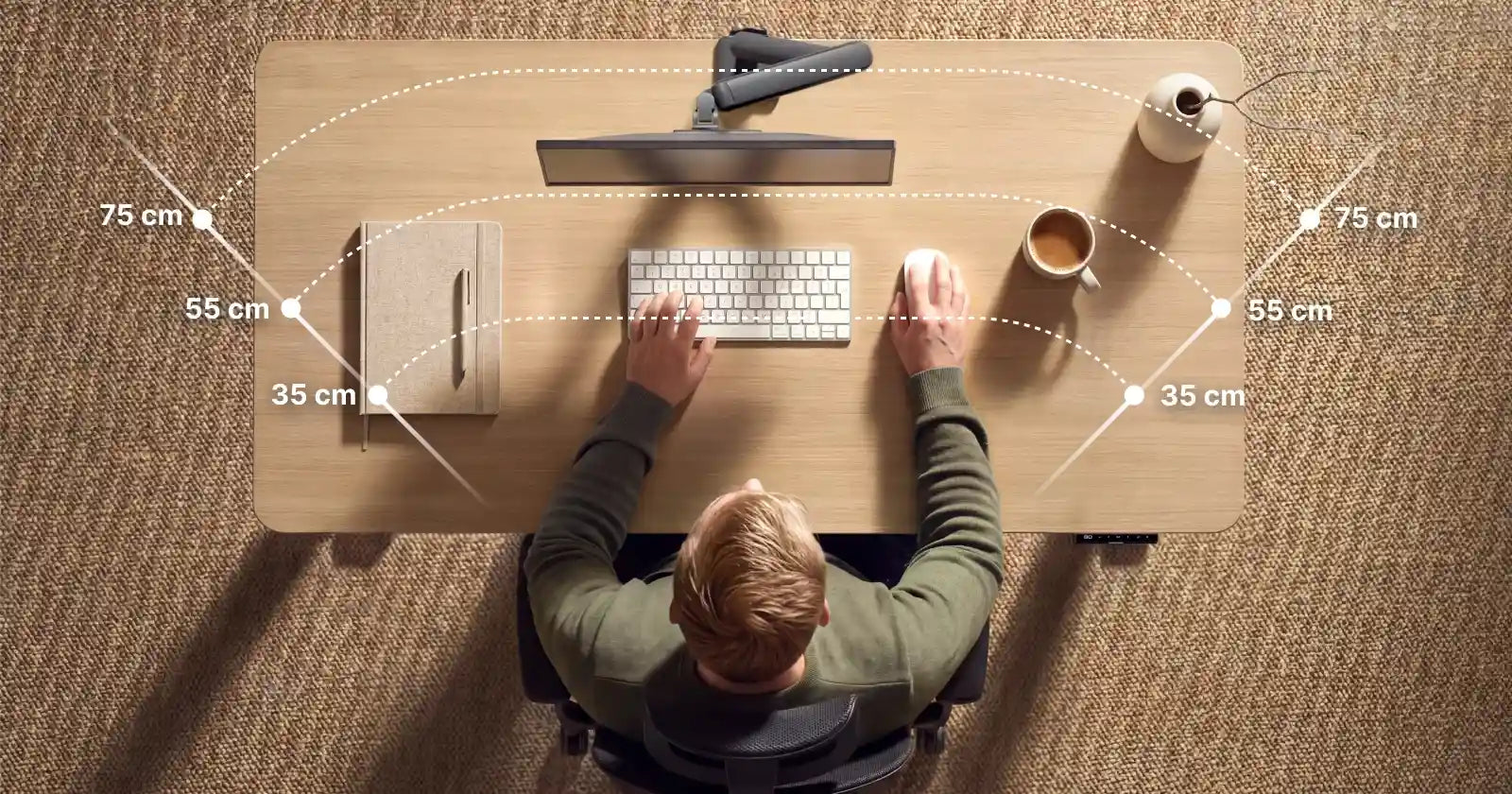
4 types of horizontal reach zones
To really understand what horizontal reach zones are, imagine rings spreading out from your body. Each ring changes how comfortable you feel.
Zone 1
A comfort zone or primary zone is the area in front of you where you can reach everything with your forearm while keeping your upper arms relaxed at your sides. Your wrists stay straight.
Keep your most used items here. Your keyboard and mouse belong in Zone 1, and so does your morning coffee. We know you reach for it often!
Zone 2
If you want to reach this area, you’re moving out of your most comfortable position, and your arm starts to stretch. It works well for things you use only occasionally. This spot is great for your water bottle, a notepad you check a few times an hour, or a second screen.
Zone 3
When you fully stretch your arms out, you reach Zone 3. This area is best for items you use only a few times a day, such as a charging cable or a desk lamp. If you find yourself reaching for something in this area often, move it closer to you.
Zone 4
Zone 4 is the maximum reach zone. If you find yourself reaching there often, it probably means something on your desk shouldn't be there. The only exception is your phone, if you don't need it for work. Keep it in Zone 4 on purpose so it's out of reach and out of mind.
| HORIZONTAL ZONE | NAME | DISTANCE from user |
|---|---|---|
| 1 | primary zone | up to 35 cm |
| 2 | secondary zone | up to 55 cm |
| 3 | extended reach | up to 75 cm |
| 4 | maximum reach | 75 cm and beyond |
Horizontal ergonomic reach zones are just general guidelines based on the average person, because everyone's body is unique. Use these distances as a starting point, but make changes that feel right for you. Some recommendations from the Health and Safety Executive (2013) include keeping your mouse within easy reach, maintaining a straight wrist, and avoiding awkward or repetitive stretching movements.
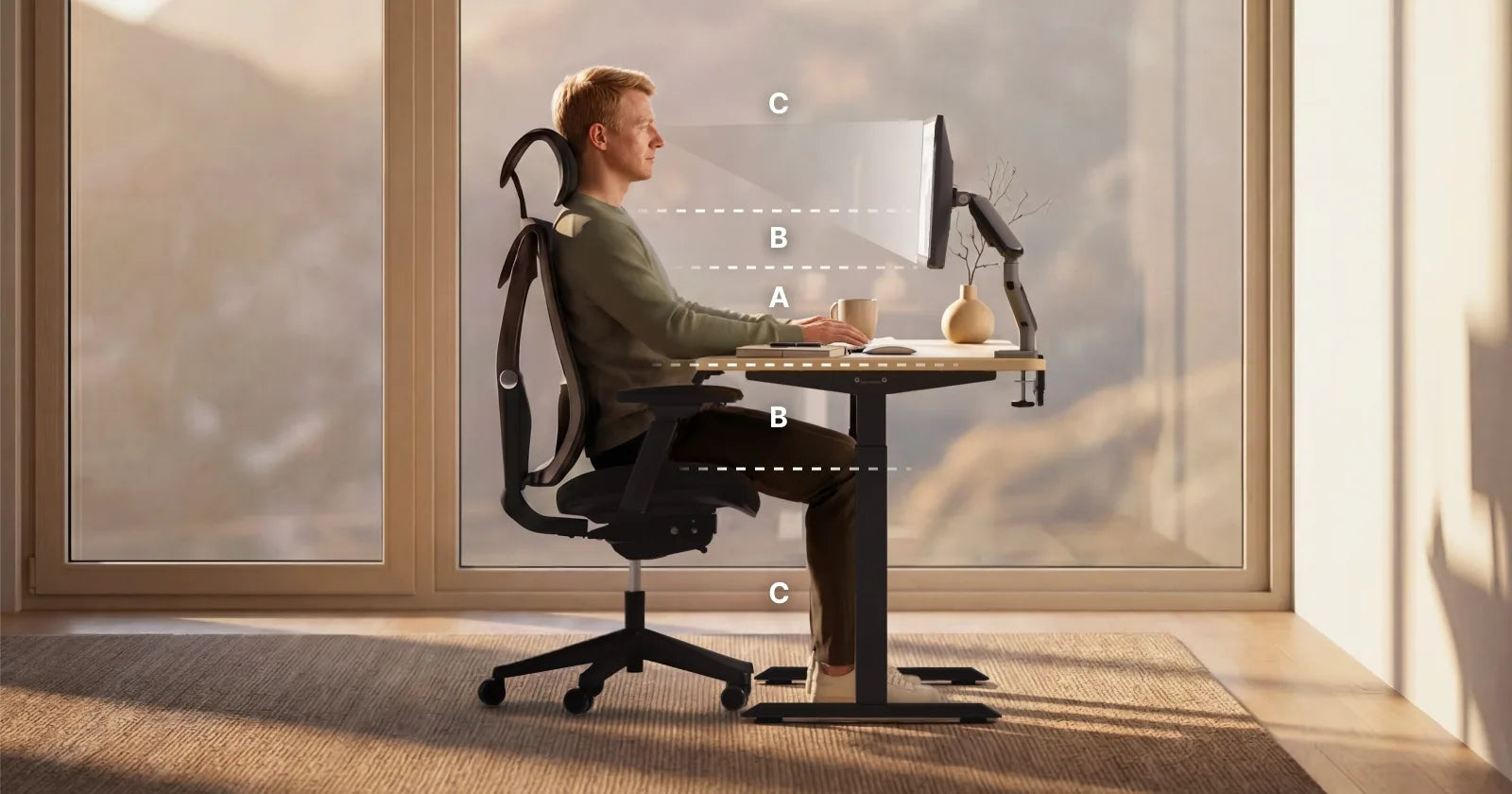
3 types of vertical reach zones
Vertical reach zones work the same way, but instead of rings spreading outward, imagine layers stacked above and below your elbows. Each of them shows how much your body has to work to reach something at that height.
Zone A
This is the area where your forearms are approximately horizontal to the tabletop. Also, your eyes are the same height as the top of the screen.
Zone B
It’s a space slightly above Zone A up to shoulder height, or below down to mid-thigh. For example, a shelf just above your monitor or a drawer you open a few times a day. These are fine occasionally, but not for constant use.
Zone C
The area above your shoulders or below your knees is called Zone C. It’s like the top shelf you have to reach for or a cable on the floor. If you lift your arms or bend your back every time, use this area only for storage.
| VERTICAL ZONE | NAME | DISTANCE |
|---|---|---|
| A | primary zone | elbow height |
| B | secondary zone | shoulder to mid-thigh |
| C | maximum zone | beyond zone B |
Vertical ergonomic reach zones are just general guidelines based on the average person, because everyone’s body is unique. Use these distances as a starting point but make changes that feel right for you.
How to set up your reach zones?
Understanding your reach zones helps you spot problems in your setup early and fix them before they grow.
Start with your chair
Your seat height affects everything else – if it doesn’t feel right, your whole workplace setup moves out of Zone A. The easiest way to start is to pick an ergonomic office chair.
After you adjust it correctly, you'll have a better starting point, but you will still need to adjust your desk height separately to get everything into Zone A. If you’re unsure which Desktronic chair to pick, learn more about ergonomic chairs that support your body before making your choice.
Add a monitor arm
You can place your screen exactly where you want in Zone A without taking up extra desk space. This keeps your reach zone open for your keyboard and mouse.
Choose a standing desk
A height-adjustable desk helps you stay in Zone A whether you sit or stand. If you are considering your options, choosing a height-adjustable desk is a good place to start, and the benefits of a height-adjustable desk can improve your comfort and focus.
Common mistakes to avoid
- Mouse on a different level from the keyboard. A height mismatch causes continuous shoulder rotation, so keep both at the same level.
- Monitor too far away or too high. You'll find yourself leaning forward or straining your neck without realising it. Adjusting your desk height is the first step to solving this problem.
- Keyboard too far away. Pushing it to the back of your sit-stand desk will force your arms out of Zone 1 all day, so keep it right at the edge of your table.
-
 HomeOne standing desk
-
Oak / White
-
Walnut / Black
-
White
-
Black
-
Olive green / Olive green
+10
Everything you need for comfortable work
+ More colours & sizes
From £299 -
-
 HomePro standing desk
-
Walnut / Black
-
Oak / White
-
White
-
Black
-
Olive green / Walnut
+10
Built to exceed every standard
+ More colours & sizes
From £399 -

